
Unveiling Skyrim: A Comprehensive Guide to Downloading the Game
Key Takeaways
- Skyrim is available on multiple platforms, including PC, Xbox, and PlayStation.
- System requirements vary by platform; check before downloading.
- Follow step-by-step instructions for a smooth installation process.
- Skyrim continues to be popular, particularly in the Southeast Asian gaming market.
- Official downloads ensure you get the latest updates and support.
Overview of Skyrim
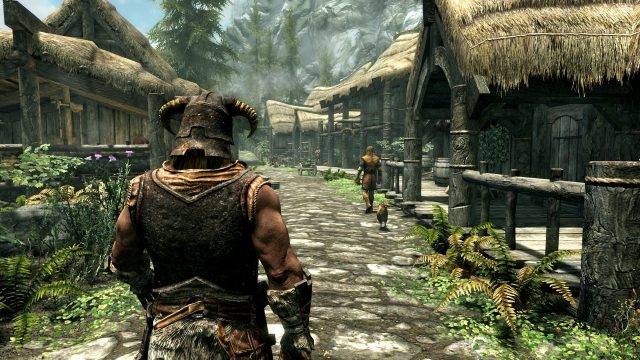
Since its initial release in 2011, Skyrim has captivated millions with its vast open world and intricate storytelling. This action RPG developed by Bethesda Game Studios allows players to explore the mythical land of Tamriel, taking on quests and battling dragons. The game has evolved over the years, receiving several updates and expansions that enhance its depth and replayability. With a dedicated community and numerous mods available, Skyrim remains a relevant choice for gamers worldwide, especially in regions like Southeast Asia, including Indonesia, where gaming culture is thriving.
Platform Availability
Skyrim is widely available across several platforms, allowing gamers to choose their preferred gaming experience. Currently, you can find Skyrim on:
- Steam - The leading platform for PC gamers.
- Epic Games Store - Available for direct purchase and download.
- PlayStation Store - For PS4 and PS5 users.
- Xbox Store - Accessible to Xbox users.
- Nintendo eShop - For Nintendo Switch players.
System Requirements
Before downloading Skyrim, it's crucial to ensure your system meets the game's requirements. Here’s what you need for different platforms:
PC Requirements
- Minimum: Windows 7/8/10, Intel Core 2 Duo 2.0 GHz or AMD Athlon 64 X2 4400+, 2 GB RAM, DirectX 9.0c compatible video card with 512 MB VGA, 6 GB free disk space.
- Recommended: Windows 7/8/10, Dual-core CPU 2.5 GHz, 4 GB RAM, NVIDIA GeForce GTX 460 or AMD Radeon HD 6850 with 768 MB+, 6 GB free disk space.
Console Requirements
For console players, the game is optimized for:
- PlayStation: PS4 or PS5 with sufficient storage space.
- Xbox: Xbox One or Xbox Series X/S with enough available space.
- Nintendo Switch: A Nintendo Switch with the game downloaded from the eShop.
How to Download
Downloading Skyrim is a straightforward process. Here's how to get started on various platforms:
PC (Steam / Epic Games Store)
- Open the Steam or Epic Games Store application.
- Search for “Skyrim” in the store’s search bar.
- Select the game from the results.
- Click on the purchase button and complete the payment process.
- Once purchased, the game will be added to your library. Click on ‘Install’ to begin downloading.
- After installation, launch the game from your library.
PlayStation
- Navigate to the PlayStation Store from your console's home screen.
- Use the search feature to locate “Skyrim.”
- Select the game and choose to buy/download it.
- Follow the on-screen instructions to complete the download and installation process.
Xbox
- Access the Xbox Store from your Xbox console.
- Search for “Skyrim” in the store.
- Select the game to purchase/download.
- Complete the transaction to start the download.
Nintendo Switch
- Open the Nintendo eShop on your Switch.
- Search for “Skyrim.”
- Select the game and proceed with the purchase.
- Once the transaction is complete, the game will download automatically.
Conclusion
Skyrim's enduring appeal lies in its captivating world and the freedom it offers players. Whether you're a seasoned gamer or new to the franchise, downloading Skyrim is an excellent investment in your gaming library. With its availability on multiple platforms, it's easier than ever to dive into Tamriel and embark on your adventure. Don’t miss out on joining the vast community of players exploring this iconic RPG, especially as interest continues to grow in markets like Southeast Asia.
Latest news
-

Your Ultimate Guide
Discover how to download Meja 365 and explore top gaming tips. Get started today! -
Your Ultimate Guide
Discover how to download Koi88 APK with our comprehensive guide. Get the latest updates and follow the easy installation... -

Unlocking the Advent
Discover how to download Breath of the Wild, its system requirements, and step-by-step installation. Start your adventur... -

Get Ready to Downloa
Discover how to download NBA 2K27 and explore its new Nvidia DLSS 5 features for a superior gaming experience. Get the g... -
Unlocking Free Primo
Discover how to earn over 11,060 Primogems for free in Genshin Impact Version 7.1 with our comprehensive download guide ... -
Your Ultimate Guide
Discover how to download the latest Android APK games with our easy guide. Start your gaming adventure now! -
Unlocking the Metroi
Discover how to download and play the best Metroidvania games. Explore platforms, system requirements, and installation ... -
Game: Ace Combat 8's
Discover expert insights on game. The Android mobile game APK guides sector continues to evolve with new trends and best...