
Unlocking the Potential of Grip Sense on Steam Controller
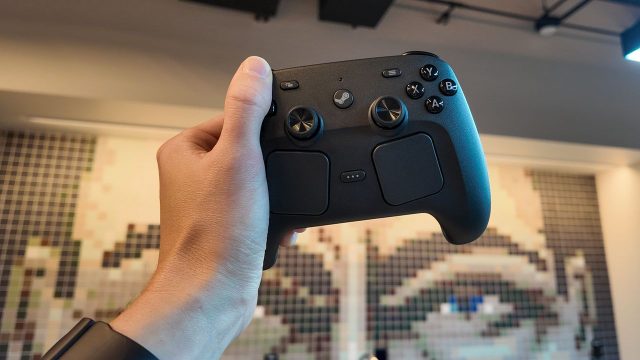
Overview of Steam Controller Grip Sense
The Steam Controller has always aimed to bridge the gap between traditional gaming controllers and more complex input devices. One of its standout features is Grip Sense, designed to provide gamers with a seamless interaction experience. This functionality detects how you hold the controller, allowing for comfortable and efficient gameplay through adaptive controls. Its intuitive design caters especially to those who enjoy fast-paced gaming, making it essential for both casual and competitive gamers.
As gaming evolves, the need for advanced features in controllers becomes increasingly important. With the rise of competitive gaming and streaming, having a controller that can adapt to your style is more than just a luxury—it's a necessity.
Why Grip Sense Matters Now
With the gaming landscape continuously changing, features like Grip Sense become pivotal in enhancing player performance. Players are looking for every advantage, and Grip Sense provides unique controls that can adjust based on your grip. This means you can have access to different functions without taking your fingers off the thumbsticks or buttons—an aspect that can be game-changing in intense situations.
Moreover, as many gamers in Southeast Asia, particularly in countries like Indonesia, are increasingly turning toward competitive online gaming, understanding how to maximize your controller’s potential has never been more relevant. By optimizing your gameplay through features like Grip Sense, you can enhance your skills and performance.
Platform Availability
The Steam Controller is compatible with PC platforms and is available through various online retailers. Its integration with Steam makes it particularly appealing to PC gamers who want to enhance their gaming experience. The controller can also be used with other platforms that support Steam, making it a versatile addition to your gaming gear.
System Requirements
While the Steam Controller itself has no specific system requirements, it is important to ensure your gaming setup is optimized for its use. Below are the general system requirements for effective use:
- Operating System: Windows 7 or higher, macOS, or Linux
- USB Port: Required for wired connection
- Steam Client: Must be installed to configure and customize controller settings
How to Download and Install Steam Controller Software
To make the most out of your Steam Controller, you'll need to download the appropriate software. Follow these simple steps:
- Download Steam: If you haven't already, visit the official Steam website to download the Steam client.
- Install Steam: Follow the installation instructions provided on the website.
- Connect Your Controller: Plug in the Steam Controller via USB or sync it wirelessly.
- Configure Settings: Open the Steam client, navigate to the Controller settings, and customize your Grip Sense settings based on your preferences.
- Update Firmware: Make sure your controller’s firmware is up to date for optimal performance.
Key Takeaways
- Grip Sense enhances gameplay through adaptive controls based on grip.
- It’s essential for both casual and competitive gamers.
- Available on PC and integrated with the Steam platform.
- Understanding features like Grip Sense can improve player performance.
Frequently Asked Questions
What is Grip Sense on the Steam Controller?
Grip Sense is a feature that detects how you hold the Steam Controller, allowing for adaptive control options during gameplay.
How does Grip Sense improve gaming?
By offering customizable controls based on your grip, it allows for faster reactions and more efficient gameplay.
Can I use the Steam Controller with other platforms?
Yes, the Steam Controller can be used with any platform that supports Steam, including various gaming PCs.
Is there any software needed for the Steam Controller?
You need to download and install the Steam client to configure and customize your Steam Controller settings.
How do I keep my Steam Controller updated?
Regularly check the Steam client for firmware updates for your controller to ensure optimal performance.
Latest news
-

Unlock the Adventure
Discover how to download Minecraft on Switch 2! Start your crafting adventure today with our comprehensive guide -

Get Ready to Downloa
Discover how to download Marvel Tokon: Fighting Souls on PS5 and PC. Find system requirements, installation steps, and m... -
Game: AppLovin misse
Discover expert insights on game. The Android mobile game APK guides sector continues to evolve with new trends and best... -

Essential Guide to D
Learn how to download Halo: Campaign Evolved on mobile devices. Get the latest updates, system requirements, and install... -

Discover the Horror:
Explore how to download the horror game Ill and step into its terrifying world. Get all details and requirements here! -
Unlocking Fun: How t
Discover how to download Tomodachi Life: Living The Dream, available on multiple platforms. Join the fun and create your... -

The Witcher 3: Downl
Discover how to download The Witcher 3 on Android. Explore system requirements, install guide, and tips for an enhanced ... -